Showing posts with label M-Internet Tools. Show all posts

Friday, March 8, 2013

0 Folx


Mac  -> M-Internet Tools-> M-Freeware -> Folx


Software Name  : Folx
Rating  : 3.5/5
Price  : Got free version and Pro version ($19.95)
Download/Official Website  : http://mac.eltima.com/download-manager.html


Overview: 
Folx is a free download manager for Mac OS X. Its friendly interface will help you take the most of your downloads. It's not overloaded with tons of unnecessary features and is extremely easy to use. All you have to do to download files is click the link in your web browser and Folx will catch it.

By the way, Folx is a 2-in-1 app: you don't need one program for common downloads and other one to download torrents. Folx can handle both as a piece of cake.
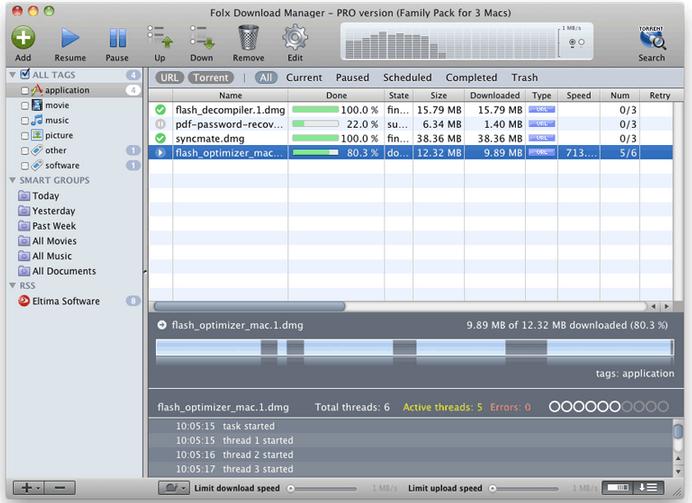


Main features:

1) Download with Folx instead of your web browser
2) Forget about the mess by tagging your downloads
3) Send downloaded music and videos to iTunes automatically

0 iGetter


Mac  -> M-Internet Tools-> M-Freeware -> iGetter


Software Name  : iGetter
Rating  : 4/5
Price : Free
Download/Official Website  : http://www.igetter.net/iGetter.html


Overview: 
iGetter is a powerful, full featured download manager and accelerator. iGetter can greatly improve the speed of your downloads using segmented downloading. In addition it allows auto resume on broken downloads, queue filtering by various criteria, site explorer, history list, scheduling downloads for low traffic periods, auto redial on broken connection, auto hang-up and shut down on completion, and much more.


Main features: 
Managing Downloads
iGetter allows you to resume downloads. If you got part of a file, iGetter will restart the download at the point where it is broken so iGetter only gets the rest of the file, without having to restart from the beginning. This makes downloading of your files much easier and faster.

Accelerated Downloading:
One of the basic features of iGetter is Segmented Downloading. This feature is very useful when the servers from which you download have limits on download speed for every connection.

0 Thunder


Mac  -> M-Internet Tools -> M-Freeware -> Thunder


Software Name  : Thunder
Rating  : 4.5/5
Price : Free  
Download/Official Website  : http://mac.xunlei.com/


Overview: 
Provides you with the highest downloading speed, Thunder is a totally Free application which allows you to batch download videos directly from HTTP\FTP\BT\EMULE\THUNDER link and it's all for FREE.

The download speed is very impressed, it supported most of the download link.

Weakness : 
Currently it’s only entitle with Chinese language versions, no English version yet.

Screen Capture:
Fig.1.1

0 µTorrent 3


Mac  -> M-Internet Tools -> M-Freeware -> µTorrent 3


Software Name  : µTorrent 3
Rating  : 4/5
Price  : Free  
               Download/Official Website  : http://www.utorrent.com/

Overview: 
µTorrent 3 is a natural evolution of the classic “tiny-but-mighty” vision. While the interface has been polished and the overall size remains smaller than your average Facebook pic, µTorrent is now packed with some insanely powerful new features.

Main Features: 
Streaming: Watch videos within seconds with progressive downloads – no need to wait. Especially great for previewing a file before committing to the full download.

Remote Access: Start, stop, and monitor torrent downloads on the go. Access your client from any Web browser, or download our Android app.

Ratings and Comments: Leverages the collective wisdom of the community to ensure the quality and security of downloaded torrents.

Feature Hiding: Minimizing parts of the µT interface with a click.

Portable Mode: Run your µTorrent client directly from a USB key and take it with you anywhere.

Stability etc.: µTorrent 3 also offers under-the-hood improvements including a focus on stability as well as improved Web seeding to add speed and reliability to the process of finding the original source of a single-source file.

Screen Capture:

Fig 1.1

0 Google Drive


Mac  -> M-Internet Tools -> M-Freeware -> Google Drive


Software Name  : Google Drive
Rating  : 4.5/5
Price  : Free  
Download/Official Website  : https://www.google.com/intl/en_GB/drive/start/index.html


Overview: 
Google Drive is everywhere you are—on the web, in your home, at the office and on the go. So wherever you are, your stuff is just...there. Ready to go, ready to share. Get started with 5 GB free.

Main feature: 
1) Create & collaborate:
- In Google Drive, you can create new documents, spreadsheets and presentations instantly. Work together at the same time, on the same doc, and see changes as they appear.

2) Work better with the products you use everyday:
- Send a link from Google Drive in Gmail and everyone has the same file, same version—automatically.

3) Powerful search:
- Google Drive helps you get to your files faster. Search for content by keyword and filter by file type, owner and more. Google Drive can even recognize objects in your images and text in scanned documents