Showing posts with label M-System Utilities. Show all posts

Tuesday, March 12, 2013

0 Live Wallpaper


Mac  -> M-System Utilities -> M-Shareware -> Live Wallpaper


Software Name  : Live Wallpaper
Rating  : 3.5/5
Price  : $0.99
Download/Official Website  : http://squidmelon.com/livewallpaper.html


Overview: 
Live Wallpaper is a beautiful wallpaper application with live clock and weather forecast. It provides a variety of themes which has different layouts and unique styles. Some themes also have beautiful animations.


Main features: 
- Multiple monitors. You can choose to display different themes for each display.
- Edit mode. You can change the position of time, clock, or text to any position.
- When switch between spaces, Live Wallpaper will appear instantly..

Screen Capture: 
Fig 1.1


Fig 1.2

Fig 1.3


Monday, March 11, 2013

0 Write Room


Mac  -> M-System Utilities -> M-Shareware -> Write Room


Software Name  : Write Room
Rating  : 3/5
Price  : $9.99
Download/Official Website  : http://www.hogbaysoftware.com/products/writeroom


Overview: 
WriteRoom is a full screen writing environment. Unlike the cluttered word processors you're used to, WriteRoom lets you focus on writing.


Main features: 
• Fast handling of large documents.
• Live word count, reading time, and more.
• Shift line up, down, left, and right commands.
• Select word, sentence, and paragraph commands.
• Everything you’d expect from a native OS X Lion app.

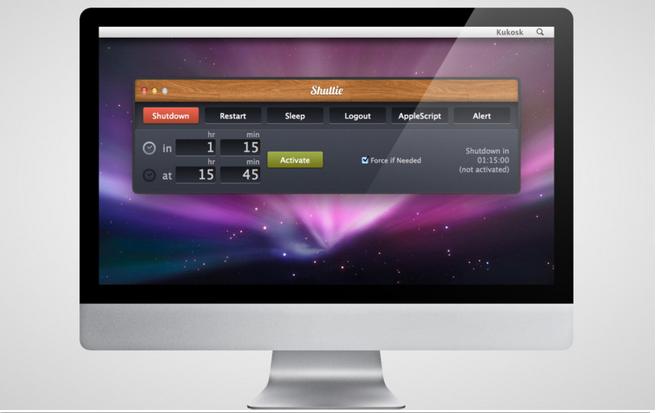
0 Shuttie


Mac  -> M-System Utilities -> M-Shareware -> Shuttie


Software Name  : Shuttie
Rating  : 3.5/5
Price  : $1.99
Download/Official Website: https://itunes.apple.com/us/app/shuttie/id415184888?mt=12


Overview: 
With this App you are able to set the time when you computer will shutdown, restart, sleep or logout you by itself. It's pretty useful when your're watching some movies from your bed, and don't have the remote controller. You don't have to stand up from the bed to shut it down, when the movie ends. Downloading some file? Want to go to sleep? Don't want you mac to be turned on all night long.


Screen Capture: 


Friday, March 8, 2013

0 Growl


Mac  -> M-System Utilities-> M-Shareware -> Growl


Software Name : Growl
Rating : 3.5/5
Price : $3.99
Download/Official Website  : http://growl.info/


Overview: 
The Ultimate Notification System for OS X. Growl is the easiest way to know what's is going on with your applications.

Main features: 
1) When you start up a Growl-enabled application, it will just work. There's no complicated setup; just install Growl once and your apps can start displaying notifications right away.

2) Growl centralizes all your notification preferences into its preferences - you can control them all from one place, and you know exactly how they are going to behave.

3) Keeps working even when you are not. Come back to your mac and review what happened while you were gone with Rollup. Plus get notifications on the go on your iPhone or iPad via Prowl

0 DropDMG


Mac  -> M-System Utilities-> M-Shareware -> DropDMG


Software Name  : DropDMG
Rating  : 4/5
Price  : $24.00
Download/Official Website  : http://c-command.com/dropdmg/


Overview: 
Create and convert disk images and archives with a simple drag and drop. There are also many other convenient ways to invoke DropDMG.

DropDMG supports all the major formats, including compressed .dmg files, .sparsebundle files, .zip and .tar.gz archives, and hybrid disk images. Zlib disk images and ZIP archives created by DropDMG are smaller than those created by Disk Utility and the Finder.

Configurations let you reuse common collections of settings, and temporary options let you easily make one-off changes. Quickly burn files, folders, disk images, or Mac OS X installers to CD or DVD. Multi-session support lets you add files to an existing CD.


Main features: 
Delivering Software : Create .dmg disk image files, design reusable layouts with Retina-optimized background images and pixel-perfect icon positioning. Add text boxes with custom fonts, styles, shadows, and variables.

Backups, Archival, and Cloning:Disk images preserve Mac-specific metadata: resource forks, Finder labels, creation dates, ownership, extended attributes, etc.Save disk space and network transfer time by compressing your files.

0 Drive Genius


Mac  -> M-System Utilities-> M-Shareware -> Drive Genius


Software Name  : Drive Genius
Rating  : 4/5
Price : $99.00
Download/Official Website  : http://www.prosofteng.com/products/drive_genius.php


Overview: 
Drive Genius includes new features such as DrivePulse®, the best way to monitor the overall health of your Mac hard drive, alerting you to possible hard drive issues before they become major problems, RAID Support, Email Notifications, and has enhanced previous features including Defrag, Repartition and Scan.


Main features: 
DrivePulse® - Monitors the overall health of your Mac hard drive, alerting you to possible issues before they become major problems.

Enhanced Defrag - Provides even better defragmentation of your files and even more fragmentation information in a new user interface to help speed up your Mac.

Enhanced Repartition - Add, delete, hide, expand or shrink OS X partitions so you can organize your Mac hard drive more efficiently.

0 Divvy


Mac  -> M-System Utilities-> M-Shareware -> Divvy


Software Name  : Divvy
Rating  : 4/5
Price  : $14.00
Download/Official Website  : http://mizage.com/divvy/


Overview: 
Divvy is an entirely new way of managing your workspace. It allows you to quickly and efficiently “divvy up” your screen into exact portions.

With Divvy, it’s as simple as a single click and drag in the Divvy interface and your window will be resized and moved to a relative portion of the screen. If that seems like too much work, you can go ahead and create as many different shortcuts as you’d like that resize and move your windows.


0 CrossOver


Mac  -> M-System Utilities-> M-Shareware -> CrossOver


Software Name  : CrossOver
Rating  : 3.5/5
Price          : $67.88
Download/Official Website  : http://www.codeweavers.com/products/#cxmac/


Overview: 
CrossOver allows you to install many popular Windows applications and PC games on your Mac. It's easy, affordable, and best of all, there's no Windows license required. Your Windows applications and games integrate seamlessly on your computer; just click and run.

CrossOver is capable of running a wide range of Windows software and games.


The Comparison / Difference between Dual-Booting, Virtual Machine Solutions and CrossOver

Fig 1.1

0 NTFS for Mac


Mac  -> M-System Utilities-> M-Shareware -> NTFS for Mac


Software Name  : NTFS for Mac (Paragon)
Rating  : 4.5/5
Price  : $19.95
Download/Official Website : http://www.paragon-software.com/home/ntfs-mac/features.html


Overview: 
Using a Mac® is a wonderful experience – until you try to use a NTFS-formatted drive, which includes most Windows® hard drives! Because in order to create, delete or modify any files on Windows NTFS drives you need Paragon NTFS for Mac® - after minutes you won’t remember there ever was a problem. Remove the barriers between NTFS and HFS with ease and confidence!


Main Features:
1) Unprecedented high NTFS performance. The transfer rate is the same as with the native HFS file system!

2) Full read/write access to NTFS. Mac® OS X provides limited support of NTFS, the primary file system of any Windows PC. With Paragon’s NTFS for Mac OS X, you’ll get full read/write access to any version of NTFS under Mac OS X

0 BetterTouchTool


Mac  -> M-System Utilities -> M-Freeware -> BetterTouchTool


Software Name : BetterTouchTool
Rating : 4/5
Price : Free  
Download/Official Website : http://www.bettertouchtool.net/index.html#


Overview: 
BetterTouchTool is a great, feature packed FREE app that allows you to configure many gestures for your Magic Mouse, Macbook Trackpad and Magic Trackpad. It also allows you to configure actions for keyboard shortcuts, normal mice and the Apple Remote. In addition to this it has an iOS companion App (BTT Remote) which can also be configured to control your Mac the way you want.
BetterTouchTool includes many goodies, like window snapping or an integrated window switcher

Screen Capture: 
1) Magic Mouse and Trackpad Configurations: 
Fig 1.1

0 Jitouch


Mac  -> M-System Utilities -> M-Shareware -> Jitouch


Software Name  : Jitouch
Rating  : 3.5/5
Price : $6.99
Download/Official Website : http://www.jitouch.com/


Overview: 
Jitouch is a Mac application that expands the set of multi-touch gestures for the new MacBook, the Magic Mouse, and the Magic Trackpad. These thoughtfully designed gestures will enable you to perform frequent tasks more easily such as changing tabs in web browsers, closing windows, minimizing windows, changing spaces, and a lot more.


Main  Features: 
Customizable Actions:
- jitouch lets you customize actions associated with each gesture as you want, whether you'd like to enable, disable, add, edit, or remove gestures, or set different actions for each application.

Character Gestures:
- Character Gestures let you draw an English letter or a simpler gesture to perform any particular action.

Changing Spaces:
- Changing to a neighboring space without using keyboard shortcuts is now possible.

1 Clean My Mac


Mac  -> M-System Utilities-> M-Shareware -> Clean My Mac


Software Name  : Clean My Mac
Rating  : 4/5
Price  : $39.85 (Lifetime License)
Download/Official Website  : http://macpaw.com/cleanmymac


Overview: 
This all-in-one cleaning suite for your Mac includes everything you may ever need to keep your Mac clean and running fast.

Fig 1.1

Main Features: 
1) Cache Cleaner - Reset outdated cache files to zero and give your apps relief.
Fig 1.2

2) Logs Cleaner -Running out of free space on your Mac?  Remove useless logs with a few easy clicks.
Fig 1.3


0 Keka


Mac  -> M-System Utilities -> M-Freeware -> Keka


Software Name                       : Keka
Rating                       : 4.5/5
Price                               : Free  
Download/Official Website       : http://www.kekaosx.com/en/


Overview: 
Keka is a free file archiver for Mac OS X, the main compression core is p7zip (7-zip port).

Compression formats supported:
7z, Zip, Tar, Gzip, Bzip2, DMG, ISO

Extraction formats supported:
RAR, 7z, Lzma, Zip, Tar, Gzip, Bzip2, ISO, EXE, CAB, PAX, ACE (PPC)

Screen Capture:
Fig 1.1

0 iStat Menus


Mac  -> M-System Utilities -> M-Shareware -> iStat Menus


Software Name  : iStat Menus
Rating  : 4/5
Price  : $16 - Shareware
Download/Official Website  : http://bjango.com/mac/istatmenus/


Overview: 
iStat Menus is an advanced Mac system monitor, covering an enormous range of stats. It lives right in your Mac’s menubar, so detailed information is only ever a glance or single click away.

Screen Capture:
Fig 1.1
 Configurations:

Fig 1.2


0 GfxCardStatus


Mac  -> M-System Utilities -> M-Freeware -> gfxCardStatus


Software Name                    : gfxCardStatus
Rating                                    : 4.5/5
Price                                    : Free  
Download/Official Website            : http://gfx.io/

Overview: 
GfxCardStatus is an unobtrusive menu bar app for OS X that allows MacBook Pro users to see which apps are affecting their battery life by using the more power-hungry graphics.

Note: This application is for Macbook Pro only which have dual graphic card.

Main feature: 
- Growl or Notification Center notifications when the GPU changes.
- The Dependencies list: open the gfxCardStatus menu when your discrete GPU is active to see what is turning it on.
- Manually switch to Integrated Only or Discrete Only mode to force one GPU on or the other.

Screen Capture:


0 Espionage 3


Mac  -> M-System Utilities -> M-Shareware -> Espionage 3


Software Name                     : Espionage 3
Rating                                : 4/5
Price                                   : $29.99 - Shareware
Download/Official Website     : http://www.espionageapp.com/

Overview: 
More than just encryption, Espionage 3 has been rewritten from the ground-up to combine folder encryption with layers of plausible deniability through a redesigned and simplified user interface. 


Screen Capture: 
Fig 1.1


Main features:
a) Maximum Data Protection
- Built to work great with Spotlight search.

0 RCDefaultApp


Mac  -> M-System Utilities -> M-Freeware -> RCDefaultApp


Software Name          : RCDefaultApp
Rating          : 4.5/5
Price                  : Free  
Download/Official Website  : http://www.rubicode.com/Software/RCDefaultApp/

Overview:
RCDefaultApp that allows a user to set the default application used for various URL schemes, file extensions, file types, MIME types, and Uniform Type Identifiers (or UTIs; MacOS 10.4 only). MacOS X uses the extension and file type settings to choose the application when opening a file in Finder, while Safari and other applications use the URL and MIME type settings at other times for content not related to a file (such as an unknown URL protocol, or a media stream).


Main feature:
- set the default application for an extension
- set the action for when various types of media are inserted or turned on, similar to the preference in Image Capture.app and iChat.app.
- default application for various Internet services can be set, similar to the preference in Safari.app and Mail.app.


Screen Capture:
Fig 1.1

Fig 1.2


Note: If you have installed parallels 8, you will definitely need this tools to help you set the default launch applications, I know you can set the default application by select "Always open with" ; but somehow, not sure why it will not work perfectly with parallels 8 (especially mp4, wmv files).  :`(

Until I found this application, and it solved my headache, Hope this help you too. :)


0 TotalFinder


Mac  -> M-System Utilities -> M-Shareware -> TotalFinder

Software Name                        : TotalFinder
Rating : 4.5/5
Price         : $18.00 - Shareware
Download/Official Website       : http://totalfinder.binaryage.com/

Overview: 
TotalFinder works like the original Finder but adds tabs, dual panel, folders on top and other useful features. TotalFinder is an add-on which gets loaded into the Finder when you launch TotalFinder.app. It does not modify your Finder files on the disk. It modifies the current instance of Finder running in memory. It works similar to SIMBL plugins which you may know from other programs. However, TotalFinder is a standalone application and is not dependent on SIMBL and should work reliably alongside other SIMBL applications.

Main Features: 

        a)Tabs feature
           - TotalFinder tabs display multiple directories within one window. TotalFinder uses the code from Google's Chrome web browser, which is why the tabs look and behave in a similar way.
Fig 1.1

           b) Dual Mode
          - Dual mode is a special mode where TotalFinder displays two Finder windows side-by-side. It is a view similar to what can be seen in classic dual-panel file managers. This is handy in situations when you want to easily move files from one panel to the other.


          c) Folders on top
          - By default Finder does not separate folders and files and displays them mixed together as you can see on the left.
          - However, some users prefer to see folders first and then files regardless of the actual sorting options.


          d) Show system files
        - By default Finder does not display hidden (system) files.
        - TotalFinder adds a keyboard shortcut to toggle display of these files without the need to restart Finder.